Introducing YugabyteDB Resource Governance

September 2, 2026
Every organization running a fleet of databases eventually hits the same wall. Infrastructure costs push you toward consolidation – fewer, larger clusters instead of hundreds of lightly utilized ones. However, consolidation brings risk. A runaway report, an inefficient query, or an unexpected traffic spike on one database can quietly starve every other application sharing the same cluster.
This is the “noisy neighbor” problem, and it has traditionally forced tough choices. Either you isolate each workload on its own dedicated cluster (safe but wasteful and expensive), or you consolidate and accept that one tenant’s workload could degrade another’s performance.
YugabyteDB Resource Governance, the CPU management engine behind YugabyteDB Multitenancy, eliminates that tradeoff.
In this blog, you’ll learn how YugabyteDB Resource Governance helps organizations safely consolidate more databases on shared infrastructure without sacrificing predictable performance. Discover how fair CPU sharing and workload controls prevent noisy neighbors, improve resource utilization, and provide the isolation needed to confidently run multi-tenant workloads at scale.
Consolidation Risks
The economics of consolidation are compelling. Shared infrastructure reduces hardware costs, simplifies operations, and makes better use of available compute. Instead of operating hundreds of database clusters, each is provisioned for peak load and mostly sits idle. Organizations want to run many applications on fewer, larger clusters.
The catch is that many applications sharing a single cluster compete for the same CPU. A single workload spike, an expensive analytical query, or an inefficient query plan can consume the majority of available CPU. This drives up latency for every other application on that cluster.
Everyone wants to consolidate to save money, but nobody wants one application to hinder another.
Introducing YugabyteDB Resource Governance
YugabyteDB Resource Governance allows multiple databases to safely share a YugabyteDB cluster while maintaining predictable application performance. Instead of letting the busiest workload consume all available CPU, it dynamically distributes CPU across active databases whenever contention occurs. This means that every database gets its fair share of compute resources, and no single application can monopolize the cluster.
CPU governance extends beyond foreground YSQL query processing to include background work generated by a database’s activity, such as compactions, flushes, and RBS operations. By accounting for both foreground and associated background CPU usage, Resource Governance provides comprehensive workload isolation and prevents background processing from becoming a source of noisy-neighbor interference.
YugabyteDB Resource Governance enforces CPU allocation within each tablet server, where work from multiple databases competes for compute resources. It groups work by database and uses Linux cgroups to define how CPU should be shared when contention occurs. Allocation is based on each database’s current demand and configured policy, not on past CPU consumption.
When CPU is available, workloads can burst beyond their guaranteed share, while cgroups enforce the configured allocation when multiple databases are competing for CPU.
This isn’t a static reservation. Elastic, fair-share CPU allocation means that workloads stay isolated during periods of contention, but they can still take full advantage of unused capacity when available.
Fair sharing, not static reservations
Traditional resource management approaches typically reserve CPU in advance. If an application is allocated four CPUs but only uses one, the remaining three sit idle, even if another application on the same cluster desperately needs them. That’s wasted capacity.
YugabyteDB Resource Governance takes a different approach.
When the cluster has spare capacity, any database can use as much CPU as it needs. Only when multiple databases begin actively competing for CPU does Resource Governance step in, ensuring every active database keeps making progress. Customers benefit from workload isolation without sacrificing overall hardware utilization.
Optional CPU Caps: A Ceiling, Not a Reservation
Fair-share scheduling handles the vast majority of multitenancy scenarios. However, some organizations need a stronger guarantee than “fair” alone can provide, which is where optional CPU caps come in.
Administrators can optionally configure a maximum CPU percentage for each database. This cap is a hard ceiling, so a database cannot consume more than its configured limit, even if additional CPU is available.
A cap limits consumption, but it does not reserve or guarantee CPU. If a capped database is idle, that CPU is available to other databases. A cap constrains how much CPU a database can use without setting aside capacity on its behalf.
One scenario where this distinction matters is chargeback and pre-provisioned capacity. When a database’s CPU allocation is tied to what the customer has purchased, a cap ensures it cannot consume more compute than allocated, even when additional CPU is available elsewhere on the cluster.
Most customers do just fine with fair-share scheduling alone. CPU caps are optional, and they exist specifically for cases like this, where “fair” isn’t restrictive enough.
User Benefits
Resource Governance was built to solve operational pain points that come with consolidating database infrastructure:
- Eliminate noisy neighbors. A reporting job, ETL process, or batch workload no longer slows down customer-facing applications.
- Consolidate more workloads. Run dozens or even hundreds of databases on shared infrastructure with confidence.
- Improve hardware utilization. Idle CPU is never wasted. Applications automatically take advantage of unused resources whenever they’re available.
- Lower infrastructure costs. Consolidation reduces the number of clusters to manage while maintaining predictable application performance.
- Simplify operations. Rather than managing hundreds of isolated database clusters, organizations can safely consolidate workloads while maintaining clear operational boundaries.
A Practical Example
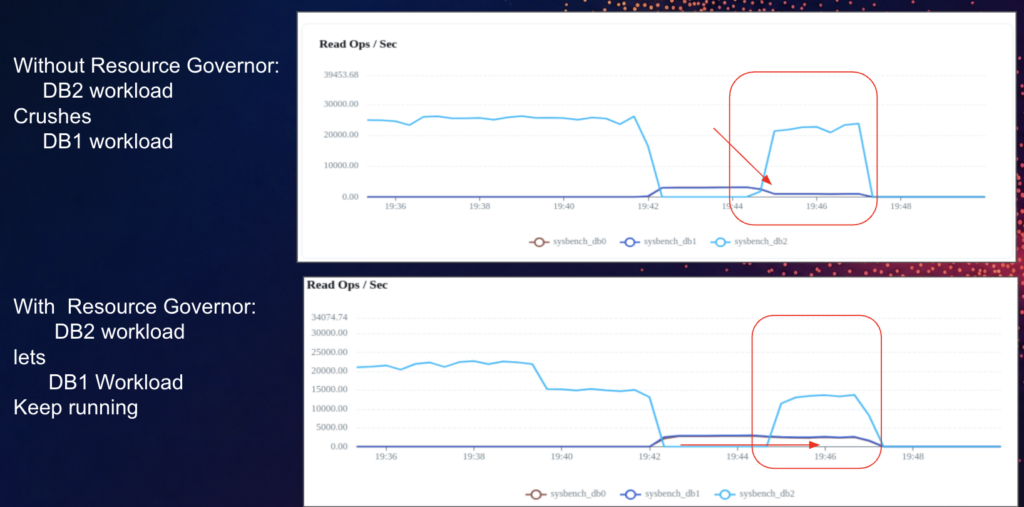
Imagine two applications sharing the same cluster: an e-commerce website and an internal reporting application.
At 9:45 AM, the reporting application kicks off a large analytical query.
Without Resource Governance, that report consumes nearly all available CPU, increasing latency for the e-commerce site. Customer transactions slow down due to a batch job the customer-facing team didn’t know was running.
With Resource Governance enabled, both applications continue to receive CPU throughout. The report may take a bit longer to complete, but customer transactions remain responsive, and the analytics platform keeps processing requests. Every workload continues to make progress, even during periods of heavy contention.
This delivers predictable performance for everyone, without the need to manually manage which workload gets priority.
Designed for Modern Multi-Tenant Platforms
Resource Governance is particularly valuable for:
- SaaS platforms hosting many customer databases
- Enterprises consolidating hundreds of internal applications
- Development, staging, and production environments sharing infrastructure
- Organizations migrating from multiple dedicated PostgreSQL servers
- Cloud-native platforms seeking higher infrastructure utilization
If any of these describe your environment, Resource Governance directly addresses the trade-offs you’ve encountered: isolate everything and pay for idle capacity, or consolidate and hope nothing goes wrong.
Enablement
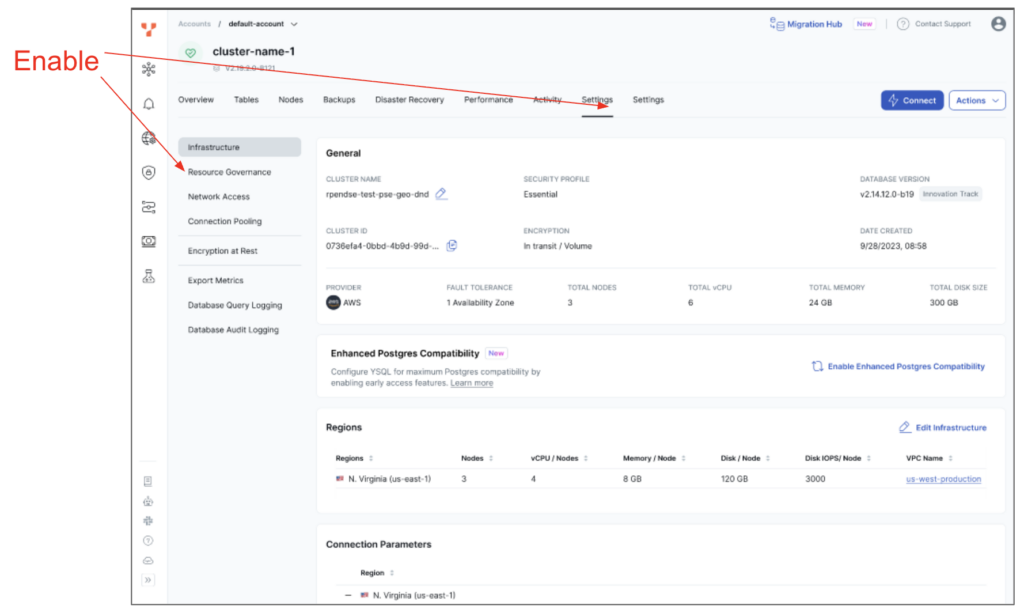
To enable Resource Governance, go to Settings →Resource Governance
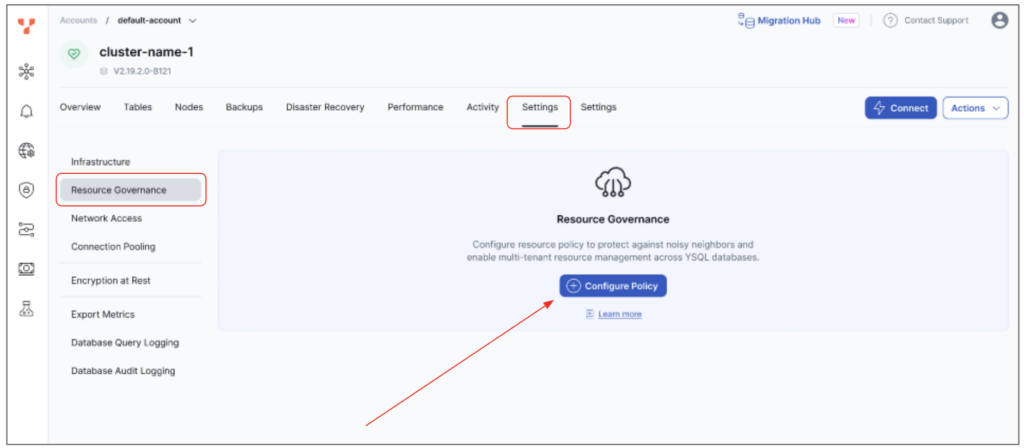
Then click Configuration Policy
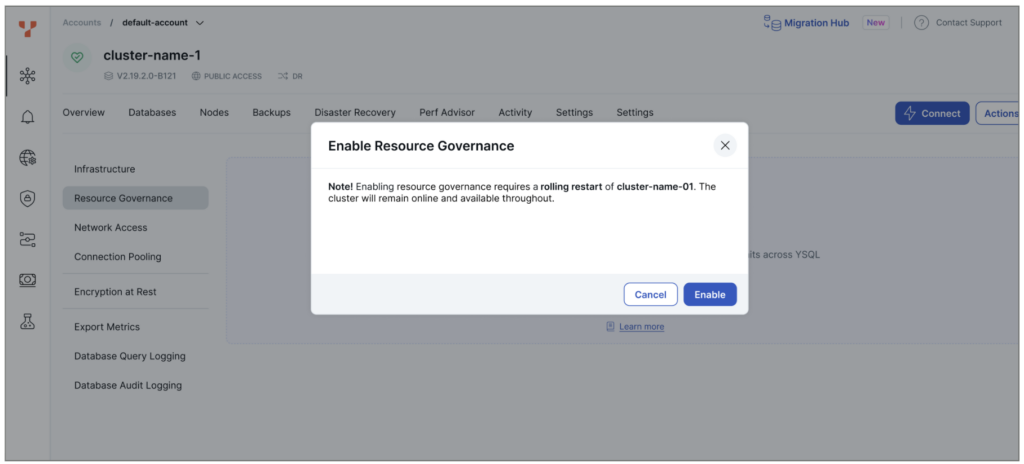
Then click Enable.
Note: Clicking Enable will cause a rolling restart of the Universe. The Universe will remain available, but with one node offline at a time until all nodes have been enabled.
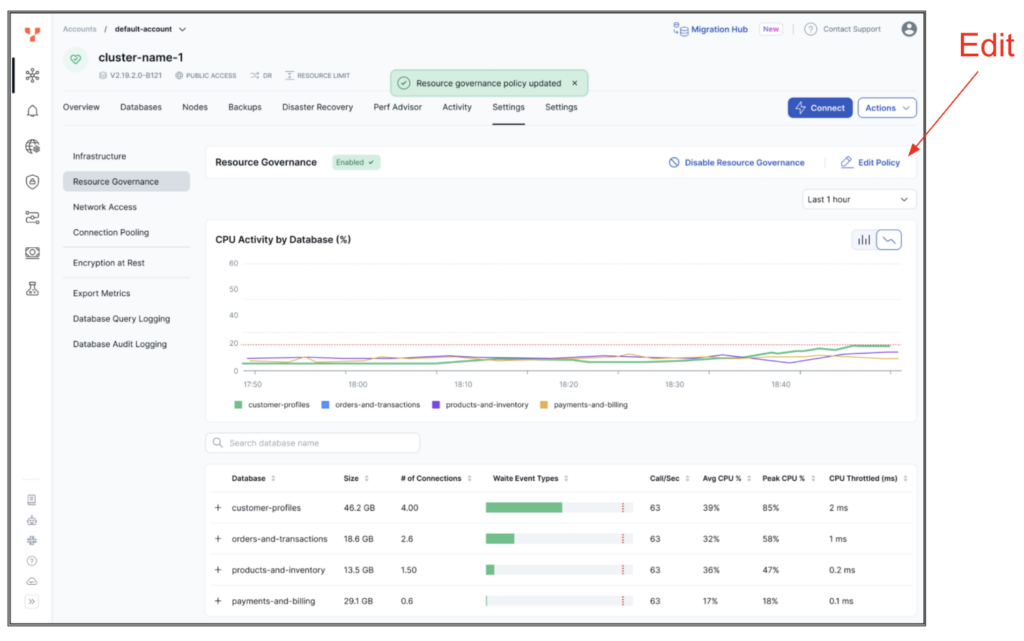
Once enabled, Settings →Resource Governance will show a graph of databases and CPU usage as well as a table of databases with more details (such as how much throttling is occurring on each database).
Optionally, click Edit Policy button if you want to set a CPU cap on databases.
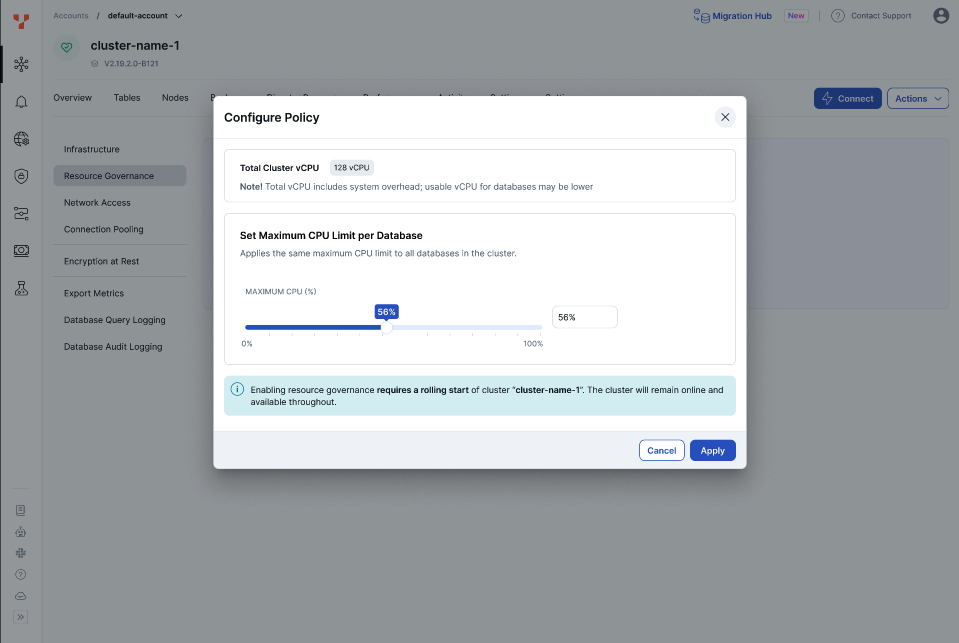
After clicking Edit Policy, you can set a CPU Max that applies equally to all databases.
CPU Max defines the maximum percentage of available CPU that each database can use. Available CPU excludes CPU consumed by the system and other management processes.
For example, if CPU Max is set to 100% but system processes consume 10% of the total CPU, databases have 90% of the total CPU available. In this case, a 100% CPU Max effectively allows a database to consume up to 90% of the system’s total CPU capacity.
Next Steps
The first release of Resource Governance is available in YugabyteDB Aeon (fully-managed YugabyteDB-as-a-service) 2026.1.1 Early Access and YugabyteDB Anywhere (self-managed YugabyteDB-as-a-service).
YugabyteDB Aeon comes with an easy-to-configure UI and a UI for monitoring database CPU usage and throttling. YugabyteDB Anywhere can be manually configured for Resource Governance. A UI will be made available on YugabyteDB Anywhere with general availability targeted for 2026.2, for both YugabyteDB Aeon and YugabyteDB Anywhere.
Today, Resource Governance focuses on CPU management because CPU contention is the most common source of workload interference in multi-tenant environments. Future enhancements will expand resource governance to additional system resources, providing comprehensive workload isolation while preserving the same elastic, fair-share resource model.
Want to try it out?
Resource Governance is available now in YugabyteDB Managed 2026.1.1 Early Access. Sign up to start consolidating your databases without sacrificing performance.